Saturday, January 28, 2012

In Support of Gingrich's Moonbase

Republican Presidential Candidate, former Speaker of the House, Newt Gingrich has come under ridicule by the media and Mitt Romney for floating an idea during a campaign speech in Florida in which he proposed a "moonbase". His quote is basically a generic campaign promise, like "I will close Guantanamo Bay".
"By the end of my second term [2020], we will have the first permanent base on the moon and it will be American,"
This has actually become a major political story, with Newt's poll numbers dropping in Florida and it becoming a debate talking point of his rivals.

I am no Newt supporter, I supported Obama in 2008 and will absolutely vote for him over any Republican in the field this time. But while it makes me cringe to say it, nothing he is saying is unreasonable, and furthermore the criticism he is getting for this one-liner reflects more on the current state of America than on Newt Gingrich's supposed erratic behavior. A sound bite from Romney during a debate has been repeated several times today:


"I spent 25 years in business, If I had a business executive come to me and say they wanted to spend a few hundred billion dollars to put a colony on the moon, I'd say, 'You're fired.'"[1]
 First of all, one angle of criticism as expressed by Romney, is that the idea itself is so outlandish that it deserves no discussion and proves some lack of reality on the part of Gingrich. Lets just step back for a bit here: In the 1960's, now nearly 5 decades ago, the US built a space program that sent multiple manned missions, that landed on the moon, allowed people to explore and return with hundreds of pounds of lunar material. This was all with a guidance computer that had a 2Mhz processor and 38KB of storage memory made out of magnetic coils[2]. Since then, though NASA and the US Government have spent 40 years stuck in Low Earth Orbit, with the Skylab and Space Shuttle programs. Regardless the technology certainly exists for physically getting people or materials to the moon, what is lacking is funding and political will. We have sent craft outside the solar system , robotic probes in orbit around other worlds such as Galileo (Jupiter), Cassini (Saturn) and Mars Reconnaissance Orbiter. We have had a continual presence in space for the past 10+ years [3], (not that far from permanent) in the International Space Station .

Not to get all science-fiction-y, but the idea of the Moon-base is hardly new, or outlandish either. Since the 1950s, Arthur C. Clarke and others(including governments) have made proposals for lunar colonization. There has been plenty of NASA and independent research on the idea of space colonization generally from the 1970s. Yes, there is plenty of debate even among space enthusiasts over the best strategy of exploration and colonization, from orbital space stations, direct to Mars missions or other ventures to asteroids, a gradual approach to all of the above etc. Not to discount any other approach (in fact, my preference would be some kind of space colony at a Langrangian point such as Earth-Moon L4/L5), but even if you search right now on NASA's website they have a whole Why the moon? page with documents from as recent as 2006 with various suggested motivations for going back to the moon, including eventually extending human civilization with permanent settlements. Among 6 reasons selected for going back to the moon (in the exploration sense, initially at least:

Human Civilization
Extend human presence to the moon to enable eventual settlement.

Scientific Knowledge
Pursue scientific activities that address fundamental questions about the history of Earth, the solar system and the universe - and about our place in them.

Exploration Preparation
Test technologies, systems, flight operations and exploration techniques to reduce the risks and increase the productivity of future missions to Mars and beyond.

Global Partnerships
Provide a challenging, shared and peaceful activity that unites nations in pursuit of common objectives.

Economic Expansion
Expand Earth's economic sphere, and conduct lunar activities with benefits to life on the home planet.

Public Engagement
Use a vibrant space exploration program to engage the public, encourage students and help develop the high-tech workforce that will be required to address the challenges of tomorrow.
Sign me up! I don't think I am alone either in my view that the Gingrich's idea itself isn't outside what is possible given our current technology, nor a worthless exercise. The timeline might be aggressive, with current NASA resources, although, the Constellation program under President George W. Bush sounds remarkably like what Gingrich is talking about, in a way, they are saying the same thing as President H.W. Bush did in 1989, when he proposed a return to nuclear rocket research[4] aimed at goals of a moon base and Mars missions. [5]

I could write a whole other article on the feasibility of nuclear rockets, after just finishing a book on the subject, The Nuclear Rocket: Making Our Planet Green, Peaceful and Prosperous, by James Dewar which delves into why chemical rockets will never truly allow for a equitable, private-sector based exploration or colonization beyond Earth orbit. In the case of the moon, we probably don't need to go there, though it adds interesting ideas to bring the cost down. That could be part of Gingrich's plan, but probably it isn't. In any case, its not even something his critics are really talking about.

This goes to my final point, obviously Gingrich has plenty of enemies now, from his current Republican rivals, to left-liberals still bitter over the 1994 Coup d'état, so as it is in politics, you don't really need a rational basis for attacking someone's ideas, it just needs to sound bad when taken out of context. But I find it odd, that even among the supposedly "patriotic" right-wing, who claims to believe so strongly in the notion of American exceptionalism, there is so little faith that such an idea, to build some kind of station on the moon in 8 years is an impossible dream? I wonder if this is the continuing creep of anti-science thought that is growing in this country, from evolution, stem-cells, climate change/global warming. This may just be the latest example where science and technological progress is denounced with no basis. Amazing that something that was done 50 years ago is now a crazy idea today!

I leave you with Niel deGrasse Tyson, making excellent points, explaining why we are declining and that we are losing our edge in space since we don't spend too much on space anyways...


References
[1] Oliphant, James, Robin Abcarian, Kim Geiger, and Michael Memoli. "Moon base! Freddie! Self-deportation! The GOP debate's top 5 moments." Los Angeles Times 27 Jan 2012, n. pag. Web. 27 Jan. 2012. <http://www.latimes.com/news/politics/la-pn-florida-debate-top-5-feistiest-moment-20120127,0,7763027.story?page=1>.
[2] O'Brien, Frank. The Apollo Guidance Computer. New York: Springer, 2010. Print. 
[3] "Facts and Figures." International Space Station. NASA, n.d. Web. 27 Jan 2012. <http://www.nasa.gov/mission_pages/station/main/onthestation/facts_and_figures.html>.
[4] Bush, George H.W. NSPD-6. “Space Exploration Initiative.” NASA Historical Reference
Collection. (File: 012605). 9 Mar. 1992. <http://www.marshall.org/pdf/materials/867.pdf>

[5] Hsu, Jeremey. "All Spaced Out: Past President's Cosmic Visions." Space.com. N.p., 16 Apr 2012. Web. 27 Jan 2012. <http://www.space.com/8234-spaced-presidents-cosmic-visions.html>. 

Images credit to NASA/courtesy of nasaimages.org.

Saturday, December 3, 2011

PunchClock 0.2.5 Released, JFace lessons

I finally got to a point where I thought enough of the nagging items with PunchClock were resolved that I would take the time to publish a new release. I am pretty proud of this release. There are no major new features but a lot of work went into making the code better, improving the infrastructure to make it a more rounded, solid product. For details on what was done, see  the PunchClock 0.2.5 release announcement.

 I've been personally using PunchClock versions daily to keep track of time at my work, I think I've pretty much gotten it to a stable, usable point. I don't see much new work going into it, unless I have some inspiration.


A couple of interesting lessons learned I think I'll share.

Utilizing JFace's built in ImageRegistry
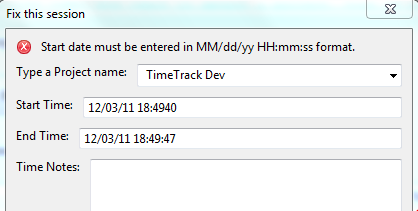
I needed to add a custom error message to my Edit Session dialog. I did this using two labels. One that displays an icon (info, warning, error) and the other will have the message text. I tried using Label.setImage() for the label with the message text, however, the image "takes over" and no text is displayed, so I needed to keep them separate.

I know JFace must have the icons somewhere as they are used by the WizardPage status messages. It turns out they are available in the org.eclipse.jface.resource.JFaceResources.getImage() utility method. The icon images are available as constants of the org.eclipse.jface.dialogs.Dialog class.

Here is the setMessage() method from my custom EditSessionDialog class, it is called by a Listener that is attached to all the widgets in the form, listening on any change.

    /**
     * Updates the status message of this dialog with errors or other
     * information to display to the user.
     *
     * @param messageText
     *            - text to display
     * @param status
     *            - one of IMessageProvider constants
     */
    public void setMessage(String messageText, int status) {
        _logger.fine(messageText + ", status: " + status);
        Image messageImage = null;
        // based on status, display appropriate icon
        switch (status) {
        case IMessageProvider.INFORMATION:
            messageImage = JFaceResources.getImage(Dialog.DLG_IMG_MESSAGE_INFO);
            break;
        case IMessageProvider.WARNING:
            messageImage = JFaceResources
                    .getImage(Dialog.DLG_IMG_MESSAGE_WARNING);
            break;
        case IMessageProvider.ERROR:
            messageImage = JFaceResources
                    .getImage(Dialog.DLG_IMG_MESSAGE_ERROR);
            break;
        case IMessageProvider.NONE:
        default:
            messageImage = null;
            break;

        }
        // update the labels with new values
        _messageLabel.setText(messageText);
        _messageIcon.setImage(messageImage);
        _messageIcon.redraw();
        // resize widgets in dialog
        _messageIcon.pack(true);
        _messageLabel.pack(true);
    }


JFace ErrorDialog
As I transitioned all of the code in PunchClock away from writing out direct to the console, and instead used java.util.logging API, it became apparent that the way that exceptions were being handled was inconsistent, and in fact exceptions were getting thrown that were never handled. It seems that if there is no ExceptionHandler defined for the Window class, the exceptions don't get shown in the UI, though the program continues to run, leading to some unexpected results, such as clicking on a button and nothing seeming to happen.

So first step was to create a class that implements IExceptionHandler and then set it as the ExceptionHandler for my main window, using Window.setExceptionHandler(). This lets me catch all Throwables thrown and not caught in the PunchClock code.

Then I did find that JFace conveniently has a prebuilt dialog for displaying errors to the UI, which before I was able to do in one off cases using a custom built SWT dialog function. The example I took my queue from was here http://www.java2s.com/Code/Java/SWT-JFace-Eclipse/JFacesErrorDialogclass.htm

My example handleException method in my ExceptionHandler

/* (non-Javadoc)
     * @see org.eclipse.jface.window.Window.IExceptionHandler#handleException(java.lang.Throwable)
     */
    @Override
    public void handleException(Throwable arg0) {
        _logger.log(Level.SEVERE, "Uncaught exception from UI", arg0);
        // Create the required Status object
        Status status = new Status(IStatus.ERROR, "PunchClock", 0,
            "Unhandled Exception "+arg0.getMessage(), arg0);

        // Display the dialog
        ErrorDialog.openError(Display.getCurrent().getActiveShell(),
            "Error Occured", "Program Error. See PunchClock.log for more details.", status);
    }

It wasn't too clear what all these parameters do in terms of where they get used in the ErrorDialog. Here is an example of the error dialog produced by above code with a NullPointerException
The title of the dialog, and the first message line is from the openError() method, second and third parameters respectively, the fourth parameter, the Status object, controls the "Reason:" message, and if you include the actual Throwable in the status it gets displayed in the expandable Details box, although that is not required, you can just pass null.

Editor's note: stay tuned for updates to the punchclock wiki and FAQ pages as I round out documentation with all the updates from the latest releases.


Thursday, November 24, 2011

XNA .NET Bouncy Rectangle Tutorial

Happy Thanksgiving!, great to have a relaxing Thursday morning on the couch, doing nothing but watching last night's NHL highlights while tinkering with some new programming technologies, drinking a cup of strong coffee.

This past summer I spent some time trying to develop some sample game code (blog post: fixed-frequency-uncoupled-game-loop) in C, using libSDL on the Linux platform. I made some progress, but it was difficult, fairly low level, and I kind of lost motivation when work picked up for me this fall.

Recently I downloaded and installed the MS Visual Studio 2010 Express with XNA Game Studio 4.0 to give Windows/XBOX/Windows Phone game programming a shot to hopefully make faster progress. I have done C# before with my adventures in the WorldWind .NET project. Here is my result of my efforts this morning, a moving rectangle sprite:

It was fairly revealing that the easy to follow first tutorial for XNA Windows game development was creating a sprite that moves around a game window, just like my bouncy rectangle game. It took me about half an hour to build the tutorial, what took several days in C with libSDL. The basic project takes care of the game loop for it and it seems to be an uncoupled model between the game logic and drawing of graphics. The game played at a constant speed plus my CPU was only around 7% utilized.

I guess the tradeoff is being locked into Microsoft products, with little hope of ever porting to other platforms. But given I am my own developer, it makes sense to use this platform to actually get some programs made. I like how all the tools are basically free and well integrated together.


Saturday, October 1, 2011

Redwoods summer update

Its been a while since I wrote about our redwood seedlings. They have been growing indoors for a little over a year now. These pictures were actually taken a few months ago when tropical storm Irene came through New England. After a fairly quiet and slow winter, these guys both started major growth spurts in the late springtime and continued to grow new needles, shoots and branches. J2 especially gained a few inches growing a new shoot straight up nearly 6 inches from where the crown used to be. B2 has seen more modest growth, but was spreading out more along the branches near the base.
J2 growing well by the window

B2 is a bit crooked
Right now, J2 is getting to be about 1.5 feet tall, while B2 has not straightened out yet, and has stayed around a foot in height.

The trunk on both is getting stiffer and covered in a brownish-red bark, the needles used to feel softer to the touch. Overall both plants feel dry to the touch and a bit prickly due to the needles.

I generally water once or twice a week, and spray with water now and then in addition to keep the branches and needles moist.

Summer is about over now up here, so I would guess we won't see much growth, and even some browning of needles, over the winter.
J2 closeup

Saturday, September 24, 2011

PunchClock 0.2.3 Released

After putting PunchClock on hold to work on C coding this past summer. I've resumed work and completed a few features for PunchClock. Mainly these greatly help me in my own job, they probably could be useful for others.

Download PunchClock 0.2.3

Tour of whats new in PunchClock 0.2.3
  •  Added new feature: Stats widget in UI 
    • Tracks how long you are spending on the current task.
    • Keeps a running total of all tasks for that calendar day: "have I billed 8 hours to my client today?"
  • Brand new Export feature
    • File > Export launches a new wizard to export a file to Excel
    • Selectable Date Range
    • Excel 97-2003 format (.xls), compatible with OpenOffice, GoogleDocs
    • Exported Excel provides automatic summations of tasks for each day by project. Color coded by day for easier review.
    • Uses Apache POI library.
  • Fixed a bug on exit that wouldn't properly save the end time for a current session.
  • Behind the scenes all the UI has now been reimplemented using JFace
  • Fixed a few other dings and scratches.

I skipped a formal release of 0.2.2 as there wasn't much new for the end user, that release mainly dealt with bug fixing and refactoring for JFace.

I am getting close to finishing what I wanted to achieve now with PunchClock, It will now be something that will be an accelerator at my own job and I will try to share it with my team. There are a few things in the UI that I would like to tighten up. For example the layout changes a little too much when the main window is resized. I could add a few more options to the Export wizard. I currently don't have support .xlsx format output. Maybe when I get around to these last few areas I would be comfortable with a version 1.0 release.

Please let me know if you have any feedback or comments.

Saturday, August 27, 2011

Fixed Frequency Uncoupled Game Loop

Version 2 of the Bouncy Rectangle program has a refactored game loop engine. After looking around at ways to separate the rate that events happen in the game from the rendering speed of the system running the program I went with an approach called Fixed-Frequency Uncoupled method. Where the game engine will run certain events at fixed frequency, while uncoupling a second module of the program that does the rendering using as much CPU speed is available. To make it interesting I also added an AI opponent, which is another blue square that follows the player around the screen. (No music this time).

To implement multi-threading I used POSIX threads (-pthreads). The fixed frequency game logic would update the game state based on user input and the physics of the moving rectangle "characters". It would then sleep for 100 ms, basically updating the game state 10 times a second.

The render loop was in the main thread and would both update the screen with the updated game state as well as do some animation interpolation based on the trajectories of the rectangles from the last game state. This also had to trap any user input (keyboard keys) and then update the game state with these inputs for when the fixed-frequency thread would next check it. To avoid synchronization issues, I used mutexes when in critical sections that accessed the shared variables containing game state info. The render loop will run as fast as the system it runs on, on my box it was humming along at 140 fps.

This is a high level diagram of the separation of the game logic:

References:

Sunday, August 14, 2011

libSDL Project

For the last few weekends I have given PunchClock and my java work a break, to get back to the fun stuff in C. I am trying to learn the open source Simple DirectMedia Layer (libSDL) api for 2d graphics.

My first simple project was to draw a background and move an object around the foreground. Enter "Bouncy Rectangle".

This is a very simple program where you control the movements of the red square by using the keyboard arrows. Pressing in a direction will either speed you up or slow you down, when you hit one of the edges your speed will be translated into the opposite direction so you "bounce" like a pool ball.

I'd like to work further on separating the movement speeds from the "game loop" which will use 100% of whatever CPU you have if you let it, which would vary the speed from system to system.

The source code is all in one file, after installing libSDL (not so simple on Ubuntu) the program was developed in Eclipse CDT.

Full Source for reference:

/*
============================================================================
Name : BouncyRectangle.c
Author : ammianus
Version : 0.0.1
Copyright : Copyright Brian Laskey 2011
Description : Bouncy rectangle SDL example
Developed in Eclipse CDT, using SDL 1.3.0
============================================================================
*/

#include <stdio.h>
#include <sdl sdl.h="">

/* game loop states */
#define GAME_LOOP_RUNNING 1
#define GAME_LOOP_STOP 0

/* movement constant */
#define MAX_VELOCITY 20
#define VELOCITY_INCREMENT 10

/* pointer to the main window surface */
SDL_Surface *screen;

/*
* Draw the graphic to the coordinates specified on to the screen.
*
* (0,0) is the top left corner of the visible screen.
*
* \param graphic the pointer to a surface containing graphic
* to draw on screen
* \param x the x-coordinate on the screen surface
* of the top-left corner of the graphic to draw
* \param y the y-coordinate on the screen surface of the top-left corner
* of the graphic to draw
*/
void drawGraphic(SDL_Surface *graphic, const int x, const int y) {
/*initialize SDL_Rect struct to hold destination blitting data*/
SDL_Rect dst;

/*fill dst with relevant information*/
dst.x = x;
dst.y = y;
dst.w = graphic->w;
dst.h = graphic->h;

/*blit the graphic to the screen*/
SDL_BlitSurface(graphic, NULL, screen, &dst);
}

/*
* Check if the velocity plus the increment is under max velocity
*/
Uint8 checkVelocity(int velocity) {
Uint8 underMax;

if (velocity + VELOCITY_INCREMENT <= MAX_VELOCITY) { underMax = 1; } else { underMax = 0; } return underMax; } /* * Check if the velocity minus the increment is under absolute max velocity */ Uint8 checkNegativeVelocity(int velocity) { Uint8 underMax; if (abs(velocity - VELOCITY_INCREMENT) <= MAX_VELOCITY) { underMax = 1; } else { underMax = 0; } return underMax; } /* * Process the SDL Event queue * * \param running pointer to running flag for game loop (passed by reference) * \param velocity_y pointer to velocity_y incremented * or decremented by up or down (passed by reference) * \param velocity_x pointer to velocity_x incremented * or decremented by left or right (passed by reference) */ void processEvents(int *running, int *velocity_y, int *velocity_x) { /*e stores the event union which is fetched from the event queue*/ SDL_Event e; /*check the event queue*/ while (SDL_PollEvent(&e)) { switch (e.type) { case SDL_KEYDOWN: if (e.key.keysym.sym == SDLK_ESCAPE) { *running = GAME_LOOP_STOP; } else if (e.key.keysym.sym == SDLK_DOWN) { /* increase or decrease current velocity */ if (checkVelocity(*velocity_y)) *velocity_y = *velocity_y + 10; } else if (e.key.keysym.sym == SDLK_UP) { if (checkNegativeVelocity(*velocity_y)) *velocity_y = *velocity_y - 10; } else if (e.key.keysym.sym == SDLK_LEFT) { if (checkNegativeVelocity(*velocity_x)) *velocity_x = *velocity_x - 10; } else if (e.key.keysym.sym == SDLK_RIGHT) { if (checkVelocity(*velocity_x)) *velocity_x = *velocity_x + 10; } break; case SDL_QUIT: *running = GAME_LOOP_STOP; break; } } fprintf(stdout, "velocity_x: %d, velocity_y: %d\n", *velocity_x, *velocity_y); } /* Call this instead of exit(), so we can clean up SDL: atexit() is evil. */ static void quit(int rc) { SDL_Quit(); exit(rc); } /* * main: no arguments * * \return: * 0 success * 1 could not init SDL * 2 could not create the screen surface * 3 graphics error */ int main(void) { Uint8 video_bpp; Uint32 videoflags; int x_offset; int y_offset; int video_w, video_h; int velocity_x, velocity_y; /*declare pointer to reference the graphic * (done here for plain C compatibility)*/ SDL_Surface *background_graphic; SDL_Surface *bouncy_rectangle; int running; int fillRectRet; /* Initialize SDL */ if (SDL_Init(SDL_INIT_VIDEO) < 0) { fprintf(stderr, "Couldn't initialize SDL: %s\n", SDL_GetError()); return (EXIT_FAILURE); } video_bpp = 0; videoflags = SDL_HWSURFACE | SDL_DOUBLEBUF; video_w = 640; video_h = 480; puts("!!!SDL_INIT!!!"); screen = NULL; /*set a 640x480x32 double-buffered window*/ if ((screen = SDL_SetVideoMode(video_w, video_h, video_bpp, videoflags)) == NULL) { fprintf(stderr, "Couldn't set %dx%d %d video mode: %s\n", video_w, video_h, video_bpp, SDL_GetError()); quit(2); } /*Example: set up a fullscreen double-buffered hardware display * surface at 640x480x32*/ /*SDL_Surface *screen = * SDL_SetVideoMode(640,480,32,SDL_HWSURFACE|SDL_FULLSCREEN|SDL_DOUBLEBUF);*/ /*load the background graphic from a file*/ background_graphic = NULL; background_graphic = SDL_LoadBMP("background1.bmp"); if (background_graphic != NULL) { puts("!!!SDL_LoadBMP!!!"); } else { fprintf(stderr, "my_graphic is NULL: %s\n", SDL_GetError()); quit(3); } /* create moving red rectangle on the surface */ bouncy_rectangle = NULL; bouncy_rectangle = SDL_CreateRGBSurface(0, 50, 50, 32, 0, 0, 0, 0); if (bouncy_rectangle != NULL) { fillRectRet = SDL_FillRect(bouncy_rectangle, NULL, SDL_MapRGB( screen->format, 255, 0, 0));
if (fillRectRet == 0) {
puts("Filled bouncy_rectangle");
} else {
fprintf(stderr, "SDL_FillRect error: %s\n", SDL_GetError());
}
} else {
fprintf(stderr, "bouncy_rectangle is NULL: %s\n", SDL_GetError());
quit(3);
}

/* initial values */
running = GAME_LOOP_RUNNING;
x_offset = 0;
y_offset = 0;
velocity_x = 0;
velocity_y = 0;
while (running) {
/*clear the screen*/
fillRectRet = SDL_FillRect(screen, NULL, SDL_MapRGB(screen->format, 0,
0, 0));
if (fillRectRet == 0) {
puts("!!!Screen Cleared!!!");
} else {
fprintf(stderr, "SDL_FillRect error: %s\n", SDL_GetError());
}

/* calculate the boundary of bouncy_rectangle against edges of screen */
/* x-axis */
if ((x_offset + 50 + velocity_x > video_w) || (x_offset + velocity_x
< 0)) { velocity_x = velocity_x * -1; } x_offset = (x_offset + velocity_x); /* y-axis */ if ((y_offset + 50 + velocity_y > video_h) || (y_offset + velocity_y
< 0)) { velocity_y = velocity_y * -1; } y_offset = (y_offset + velocity_y); /*draw the background*/ drawGraphic(background_graphic, 0, 0); fprintf(stdout, "x %d, y %d\n", x_offset, y_offset); /* move the rectangle across the screen */ drawGraphic(bouncy_rectangle, x_offset, y_offset); puts("!!!Draw!!!"); /*update the screen*/ SDL_Flip(screen); puts("!!!Flip!!!"); /*check the event queue*/ processEvents(&running, &velocity_y, &velocity_x); /* pause the program so CPU doesn't go to 100% */ SDL_Delay(40); } /*deinitialize SDL*/ SDL_Quit(); puts("!!!SDL_Quit!!!"); return EXIT_SUCCESS; }


The build command I used was:

gcc -O0 -g3 -pedantic -Wall -c -fmessage-length=0 -MMD -MP -MF"src/BouncyRectangle.d" -MT"src/BouncyRectangle.d" -o"src/BouncyRectangle.o" "../src/BouncyRectangle.c"


And the linking command was:

gcc -L/usr/local/lib -o"SB-Proto1" ./src/BouncyRectangle.o -lSDLmain -lSDL


References
Helpful sites that allowed me to get this far